> For the complete documentation index, see [llms.txt](https://cube.ewelink.cc/llms.txt). Markdown versions of documentation pages are available by appending `.md` to page URLs; this page is available as [Markdown](https://cube.ewelink.cc/getting-started/add-devices/zigbee-devices.md).
# Zigbee Devices
Here's a full guide to adding Zigbee devices to your CUBE setup.
## **1. Install Zigbee Adapters**
If you have followed the optional steps for Zigbee when installing CUBE, you can jump to [Step 2](#id-2.-initialize-zigbee) to initialize your dongle as your Zigbee network coordinator.
Before adding a Zigbee device, you need a Zigbee adapter, typically a USB dongle. Insert the Zigbee adapter into the USB port of the device running CUBE OS.
**For Virtual Machine Users**: After inserting the Zigbee adapter, add it to the virtual machine settings and restart CUBE. Detailed steps can be found in the virtual machine [installation guide](/getting-started/quickstart/virtual-machine.md).
### **1.1 Compatible Adapters**
CUBE is compatible with various Zigbee adapters from different manufacturers. It currently supports protocol stacks such as EZSP, Deconz, Zstack, and Zigate. Although any adapter supporting these protocol stacks can be used, the following are recommended:
> SONOFF ZBDongle-MAX\
> SONOFF ZBDongle-PMG24\
> SONOFF ZBDongle-LMG21\
> SONOFF ZBDongle-E\
> SONOFF ZBDongle-P\
> [Others listed](https://darkxst.github.io/silabs-firmware-builder/) by developer @darkxst
## **2. Initialize Zigbee**
{% stepper %}
{% step %}
After plugging in your Zigbee adapter. CUBE shows a pop-up, such as `Dongle Connected` when the adapter is detected.
{% endstep %}
{% step %}
Using a **SONOFF Zigbee dongle**, click `Start Setup`.
If the dongle already runs a supported Zigbee firmware version, CUBE completes setup automatically. If the firmware version is not supported, CUBE provides one-click flashing to the recommended stable version.
{% endstep %}
{% step %}
Using a **non-SONOFF Zigbee adapter**, click `Start Setup`.
If the adapter already runs a supported Zigbee firmware version, CUBE completes setup automatically. If the firmware version is not supported, use the vendor's flashing tool to install the recommended stable version before you continue. **Otherwise**, CUBE cannot control Zigbee devices with that adapter.
{% endstep %}
{% step %}
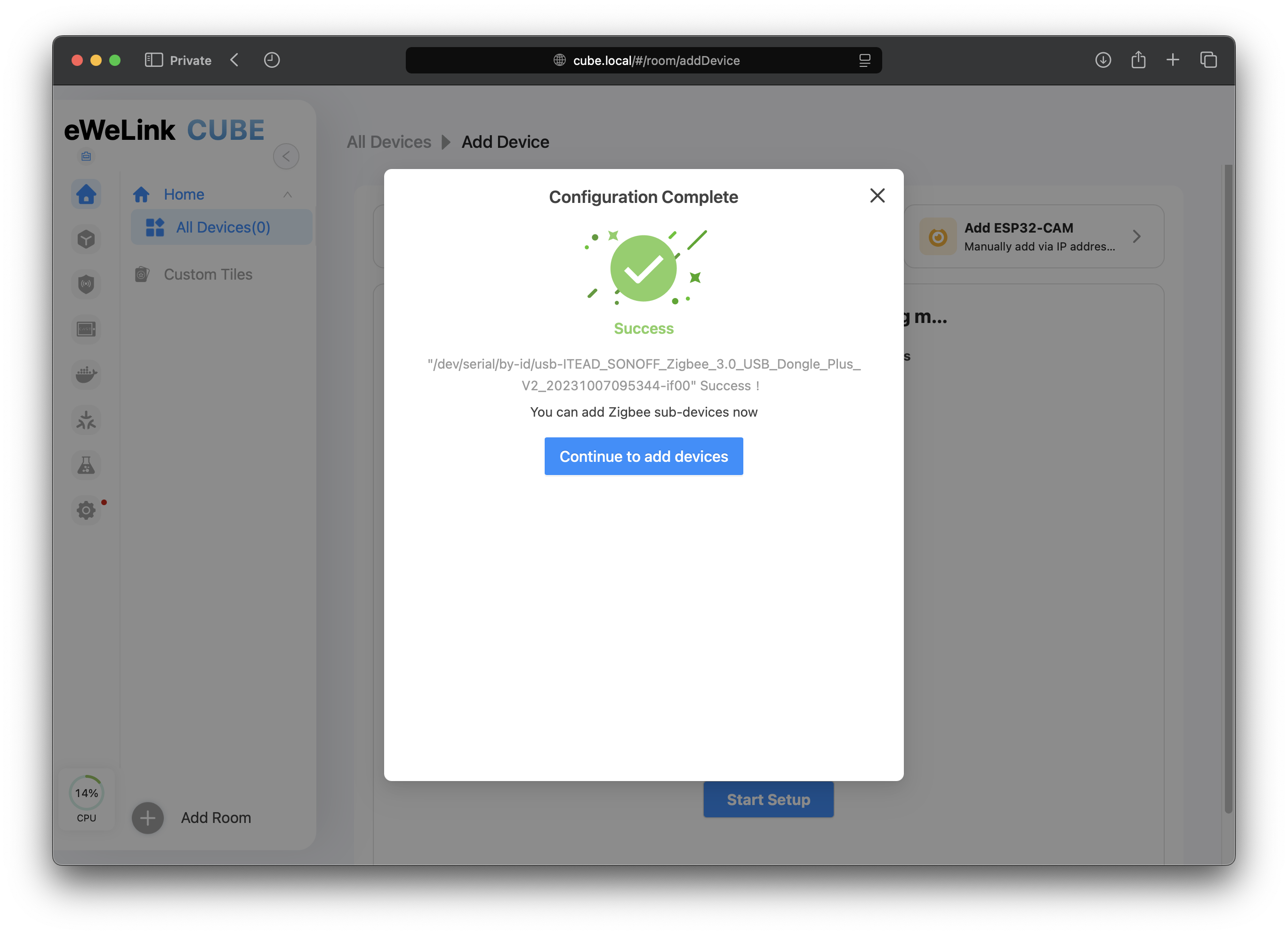
Once the adapter has completed its firmware upgrade and configuration, you can now add Zigbee devices.
{% endstep %}
{% step %}
If CUBE does not detect your Zigbee adapter, add it manually by entering the required information:
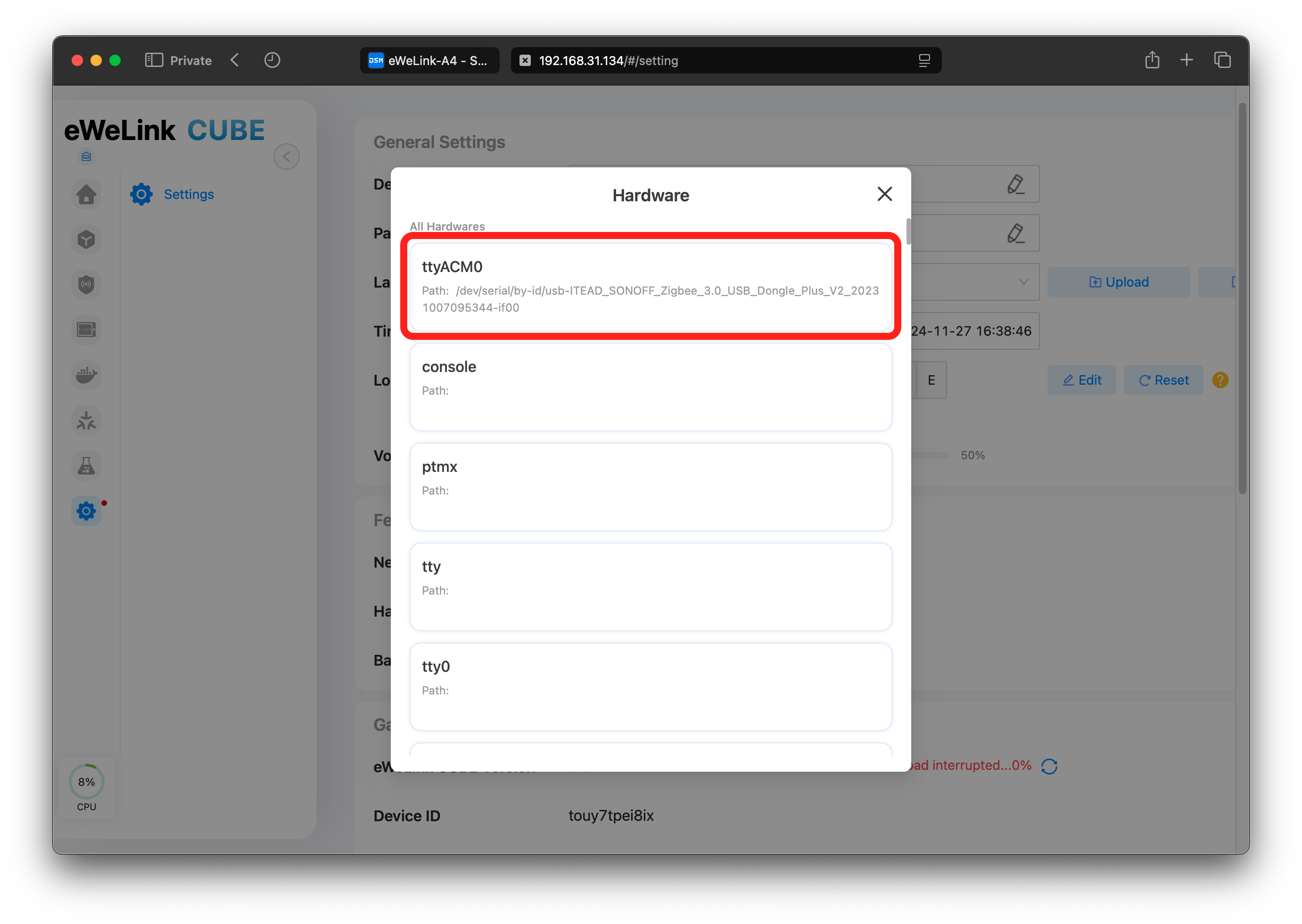
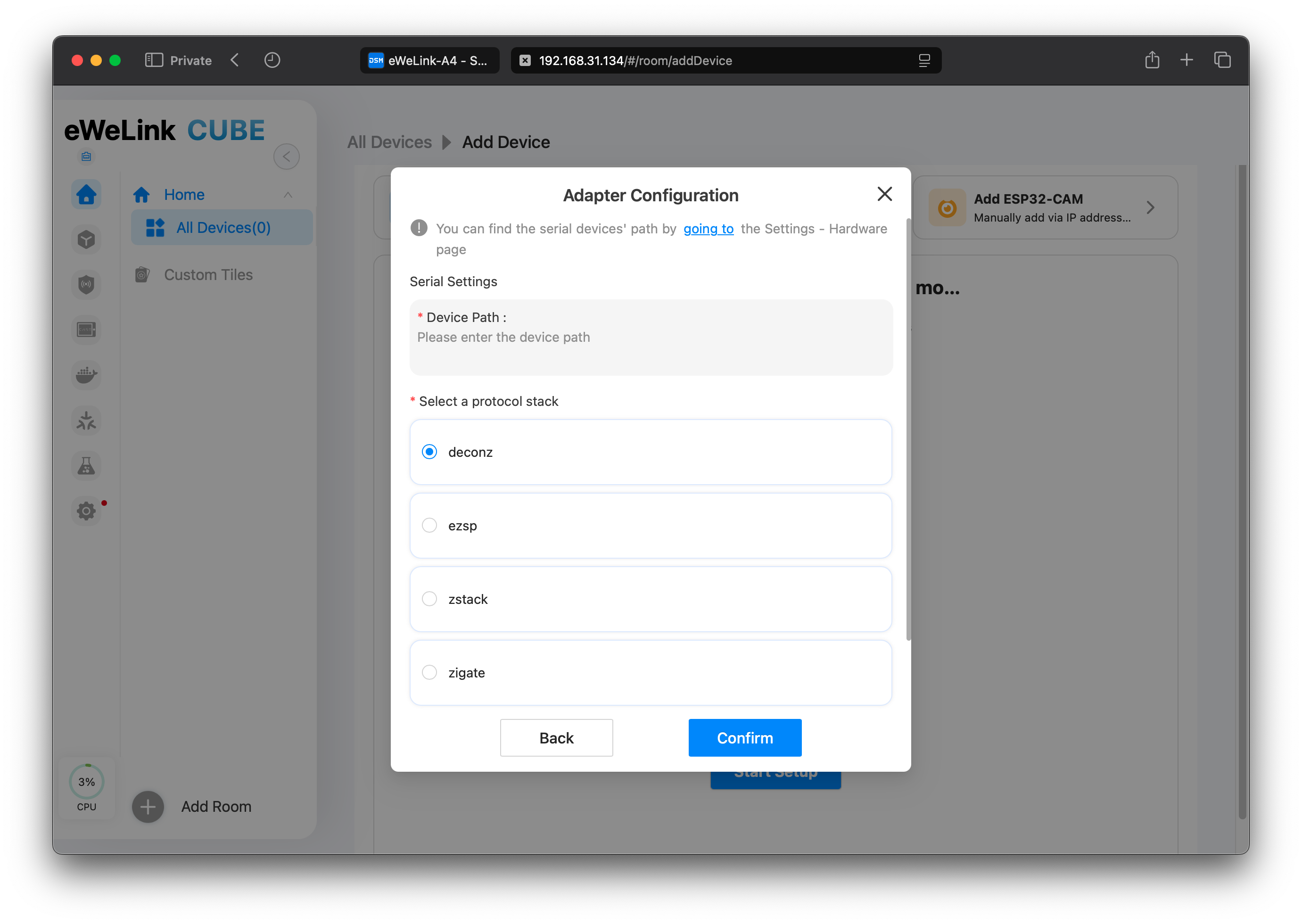 * **Serial Path**: Check the “All Hardware” section on the settings page for the serial port path of the inserted Zigbee adapter.
 * **Protocol Stack Type**: CUBE currently supports EZSP, Deconz, ZStack, and Zigate. Check the adapter documentation or purchase page for the correct type.
* **Port Speed**: Optional. Not required for all Zigbee adapters.
* **Data Flow**: Optional. Not required for all Zigbee adapters.
Click `Confirm` to save the configuration. If the setup succeeds, you can start adding Zigbee devices. If it fails, check the error message and update the configuration.
* **Protocol Stack Type**: CUBE currently supports EZSP, Deconz, ZStack, and Zigate. Check the adapter documentation or purchase page for the correct type.
* **Port Speed**: Optional. Not required for all Zigbee adapters.
* **Data Flow**: Optional. Not required for all Zigbee adapters.
Click `Confirm` to save the configuration. If the setup succeeds, you can start adding Zigbee devices. If it fails, check the error message and update the configuration.
 {% endstep %}
{% endstepper %}
{% hint style="info" %}
Since a Zigbee network can only have one adapter configuration, multiple setups are not supported. If a configured adapter is removed and then reinserted, CUBE will automatically detect the device and guide you to restore itself without needing reconfiguration.
{% endhint %}
## **3. Add Zigbee Devices**
{% stepper %}
{% step %}
After configuration, on the add device page, click “Start Pairing” to add Zigbee devices in pairing mode automatically.
{% hint style="info" %}
If your Zigbee device is not found, ensure the device is in network configuration mode and check for excessive surrounding radio interference.
{% endhint %}
{% endstep %}
{% endstepper %}
{% hint style="info" %}
Since a Zigbee network can only have one adapter configuration, multiple setups are not supported. If a configured adapter is removed and then reinserted, CUBE will automatically detect the device and guide you to restore itself without needing reconfiguration.
{% endhint %}
## **3. Add Zigbee Devices**
{% stepper %}
{% step %}
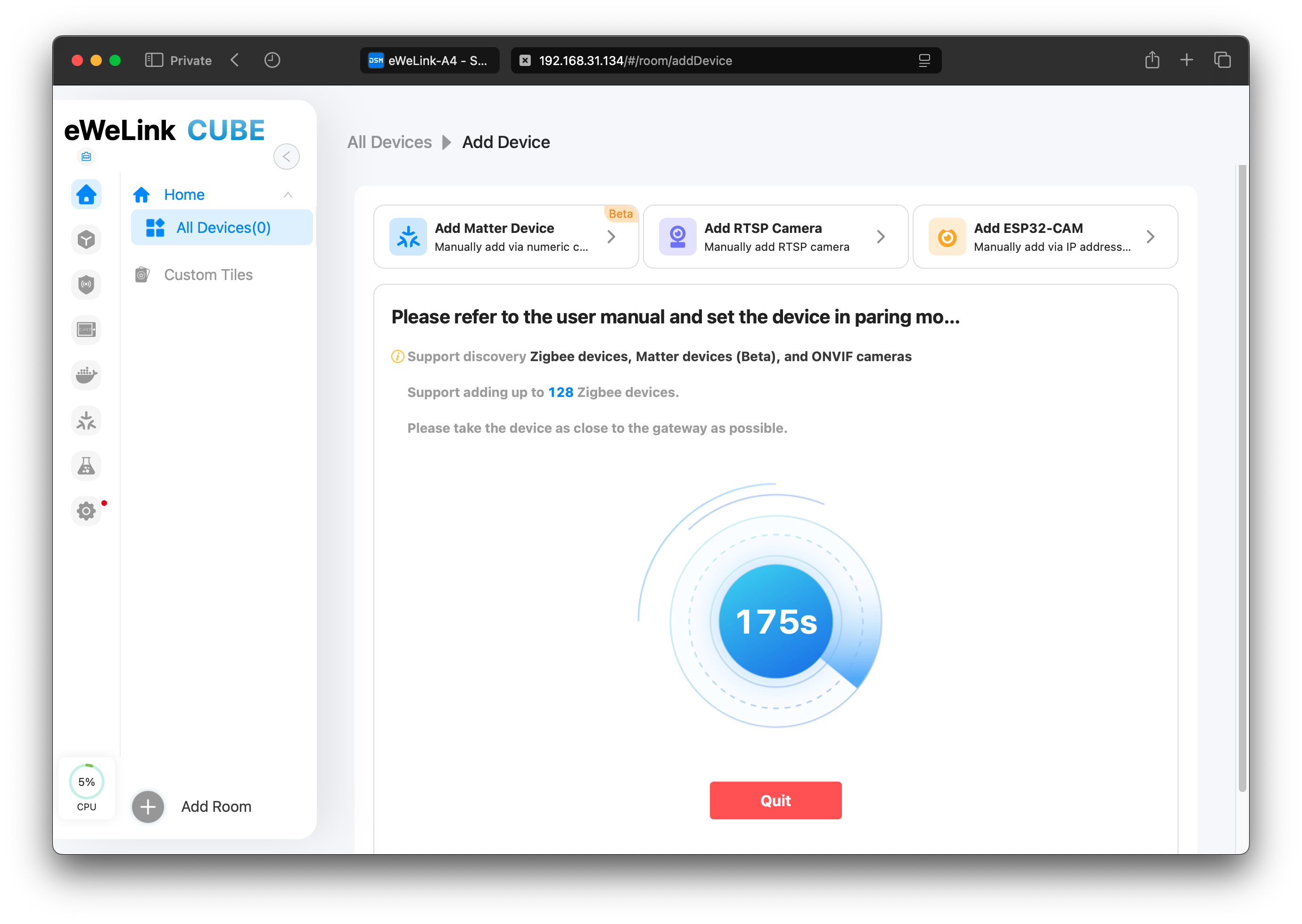
After configuration, on the add device page, click “Start Pairing” to add Zigbee devices in pairing mode automatically.
{% hint style="info" %}
If your Zigbee device is not found, ensure the device is in network configuration mode and check for excessive surrounding radio interference.
{% endhint %}
 {% endstep %}
{% step %}
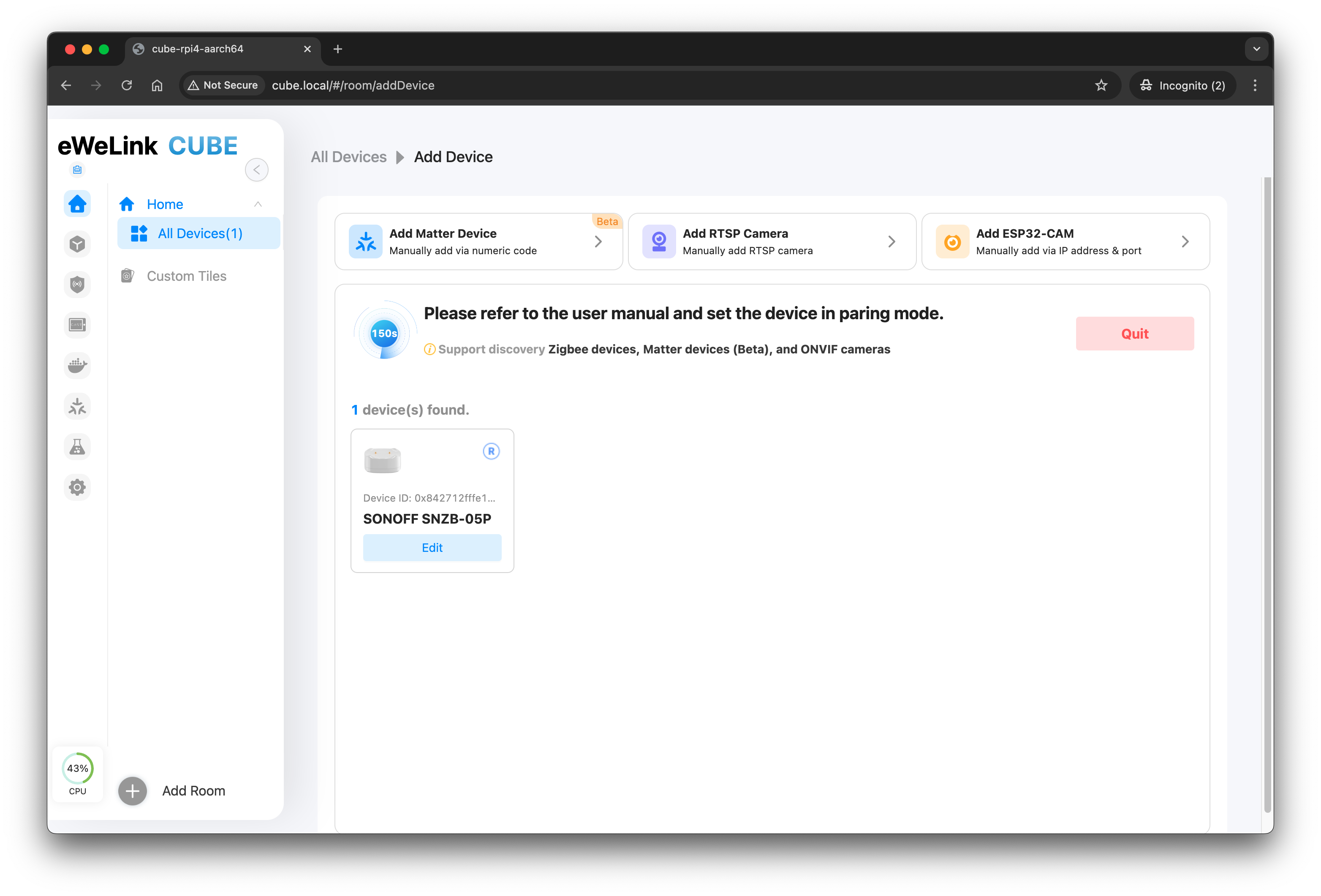
Discovered Zigbee devices will then be added to your CUBE OS, ready to assign a room or edit the name.
{% endstep %}
{% step %}
Discovered Zigbee devices will then be added to your CUBE OS, ready to assign a room or edit the name.
 {% endstep %}
{% endstepper %}
{% hint style="info" %}
The total number of Zigbee devices that can be added is limited, depending on the adapter's hardware and firmware.
In certain cases, you need to add extra router devices (e.g. smart plugs, lights, signal repeaters) to add more battery-powered devices like sensors.
{% endhint %}
## 4. Potential Compatibility
CUBE is **compatible with hundreds of Zigbee devices**. However, substantial differences exist between products from different manufacturers due to the complexity and wide range of devices. This means compatibility with all devices cannot be guaranteed, but improvements will be made iteratively.
Please direct you to check the to check the compatibility.
---
# Agent Instructions
This documentation is published with GitBook. GitBook is the documentation platform designed so that both humans and AI agents can read, navigate, and reason over technical content effectively. Learn more at gitbook.com.
## Querying This Documentation
If you need additional information that is not directly available in this page, you can query the documentation dynamically by asking a question.
Perform an HTTP GET request on the current page URL with the `ask` query parameter, and the optional `goal` query parameter:
```
GET https://cube.ewelink.cc/getting-started/add-devices/zigbee-devices.md?ask=&goal=
```
`ask` is the immediate question: it should be specific, self-contained, and written in natural language.
`goal` is optional and describes the broader end goal you are ultimately trying to accomplish on behalf of the user. GitBook uses it to tailor the answer towards what is most useful for that goal.
The response will contain a direct answer to the question and relevant excerpts and sources from the documentation.
Use this mechanism when the answer is not explicitly present in the current page, you need clarification or additional context, or you want to retrieve related documentation sections.
{% endstep %}
{% endstepper %}
{% hint style="info" %}
The total number of Zigbee devices that can be added is limited, depending on the adapter's hardware and firmware.
In certain cases, you need to add extra router devices (e.g. smart plugs, lights, signal repeaters) to add more battery-powered devices like sensors.
{% endhint %}
## 4. Potential Compatibility
CUBE is **compatible with hundreds of Zigbee devices**. However, substantial differences exist between products from different manufacturers due to the complexity and wide range of devices. This means compatibility with all devices cannot be guaranteed, but improvements will be made iteratively.
Please direct you to check the to check the compatibility.
---
# Agent Instructions
This documentation is published with GitBook. GitBook is the documentation platform designed so that both humans and AI agents can read, navigate, and reason over technical content effectively. Learn more at gitbook.com.
## Querying This Documentation
If you need additional information that is not directly available in this page, you can query the documentation dynamically by asking a question.
Perform an HTTP GET request on the current page URL with the `ask` query parameter, and the optional `goal` query parameter:
```
GET https://cube.ewelink.cc/getting-started/add-devices/zigbee-devices.md?ask=&goal=
```
`ask` is the immediate question: it should be specific, self-contained, and written in natural language.
`goal` is optional and describes the broader end goal you are ultimately trying to accomplish on behalf of the user. GitBook uses it to tailor the answer towards what is most useful for that goal.
The response will contain a direct answer to the question and relevant excerpts and sources from the documentation.
Use this mechanism when the answer is not explicitly present in the current page, you need clarification or additional context, or you want to retrieve related documentation sections.


