# eWeLink-Remote 子设备

您可以将 CUBE OS 转换为 eWeLink 远程网关，允许集成如以下的子设备： [**S-MATE 2**](https://sonoff.tech/en-us/products/sonoff-s-mate-extreme-switch-mate/58) **或** [**R5**](https://sonoff.tech/en-us/products/sonoff-switchman-r5-scene-controller/58).

{% hint style="info" %}
**什么是 eWeLink-Remote 控制？**

eWeLink-Remote 控制是针对 SONOFF 设备的独特新型远程控制方案。它为您的家用电器提供了更便捷、更可靠且更远距离的控制方式。

有关详细信息，请参阅：

<https://sonoff.tech/news-and-events/what-is-ewelink-remote-control/>
{% endhint %}

## 1. 在 Pilot 中启用 eWeLink-Remote 控制

{% stepper %}
{% step %}
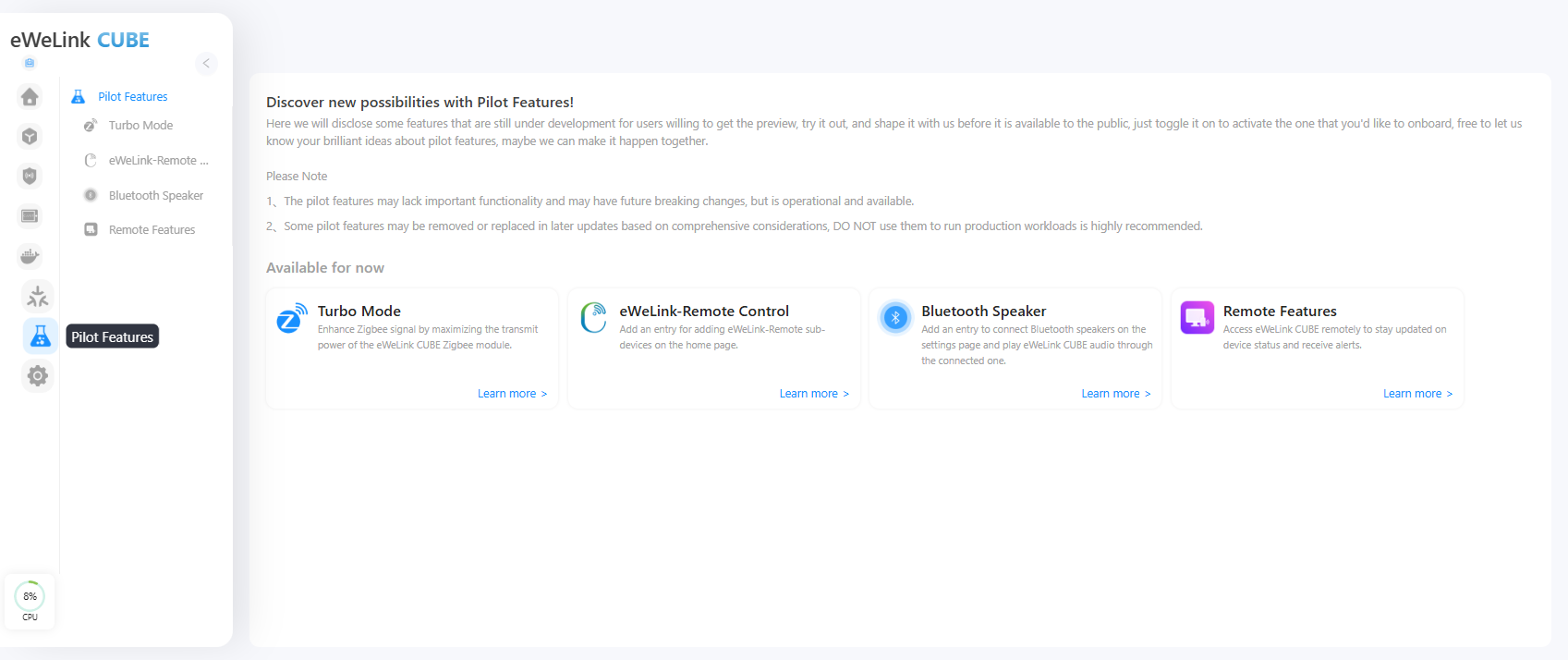
从左侧边栏，进入 **Pilot 功能**.

<figure><img src="https://2213833752-files.gitbook.io/~/files/v0/b/gitbook-x-prod.appspot.com/o/spaces%2FCnF8kmk9yw3yiy2mRerq%2Fuploads%2FZEo3wAr10BGuQxbdRMaO%2Fimage.png?alt=media&#x26;token=9c6fabd6-41a9-4f6d-b646-8a8dd4fef4c1" alt=""><figcaption></figcaption></figure>
{% endstep %}

{% step %}
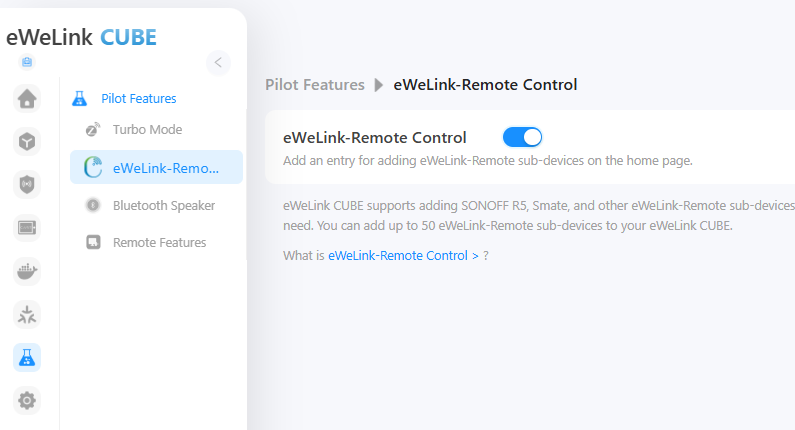
找到 **eWeLink-Remote 控制** 并点击 **了解更多**。切换开关以 **enable** 启用此功能。

<figure><img src="https://2213833752-files.gitbook.io/~/files/v0/b/gitbook-x-prod.appspot.com/o/spaces%2FCnF8kmk9yw3yiy2mRerq%2Fuploads%2F6jTwIiywVmGfFeNzgwCp%2Fimage.png?alt=media&#x26;token=1c8b9de5-da5d-43fe-bf99-174744f7019c" alt=""><figcaption></figcaption></figure>
{% endstep %}

{% step %}
一旦启用，CUBE OS 将激活 eWeLink-Remote 协议并准备接收来自兼容设备的信号。
{% endstep %}
{% endstepper %}

## 2. 添加 eWeLink-Remote 子设备（以 R5 为例）

{% stepper %}
{% step %}
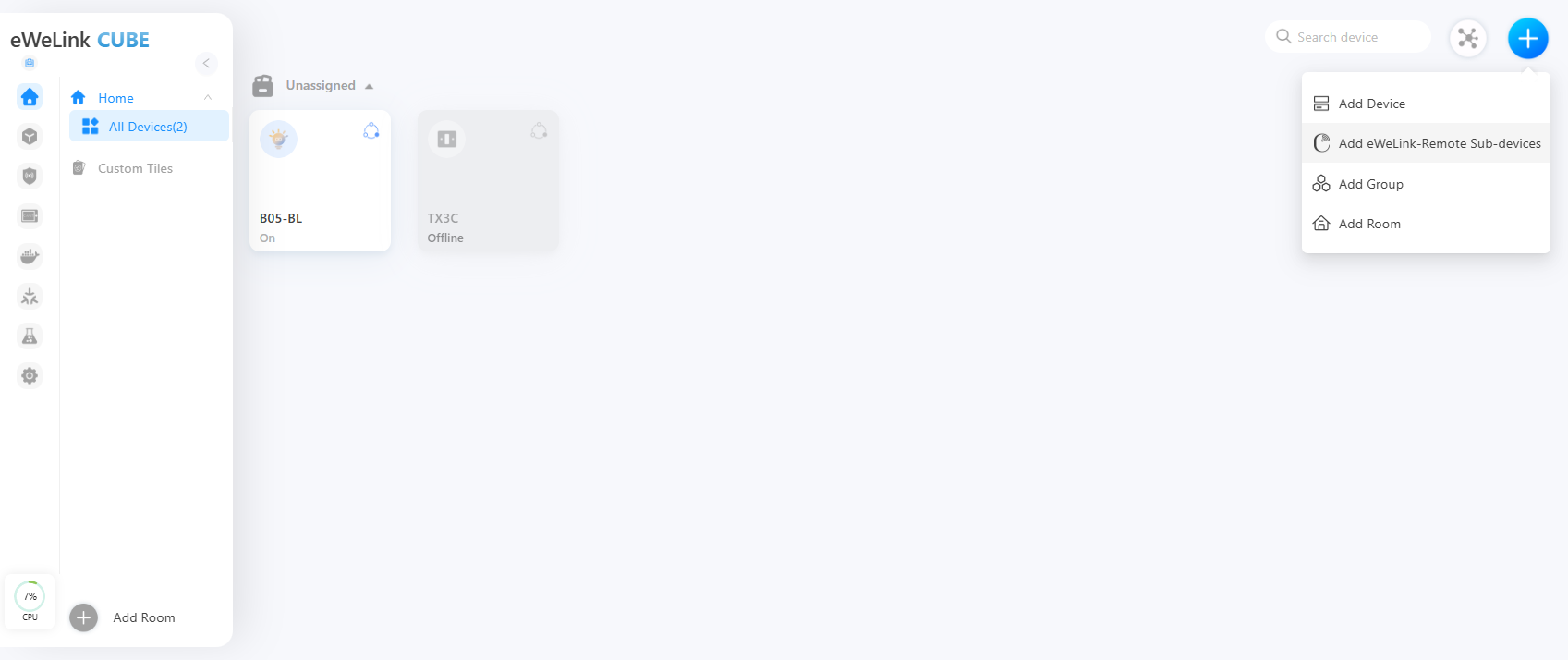
返回到 **主页** 页面。点击 **“+”** 图标在右上角。选择 **eWeLink-Remote 子设备** 从列表中。

<figure><img src="https://2213833752-files.gitbook.io/~/files/v0/b/gitbook-x-prod.appspot.com/o/spaces%2FCnF8kmk9yw3yiy2mRerq%2Fuploads%2FBYRgvHkeuVXPM1nKwtLW%2Fimage.png?alt=media&#x26;token=44c00967-d834-4feb-aeab-e05a1b946809" alt=""><figcaption></figcaption></figure>
{% endstep %}

{% step %}
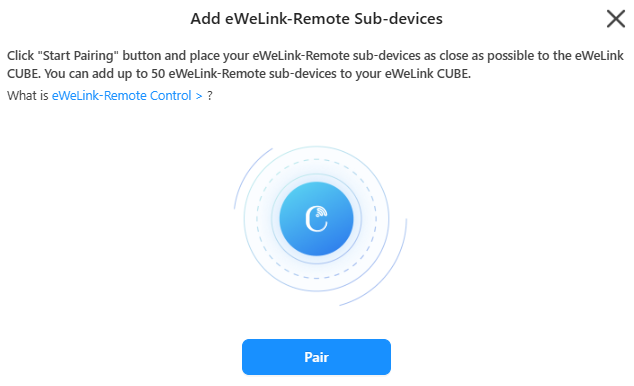
点击 **配对** 以进入配对模式。

<figure><img src="https://2213833752-files.gitbook.io/~/files/v0/b/gitbook-x-prod.appspot.com/o/spaces%2FCnF8kmk9yw3yiy2mRerq%2Fuploads%2FyKCwZCHFvGshpwhXVSHo%2Fimage.png?alt=media&#x26;token=7119b5b0-0a5f-411a-bdbb-882a29cfb1a3" alt=""><figcaption></figcaption></figure>
{% endstep %}

{% step %}
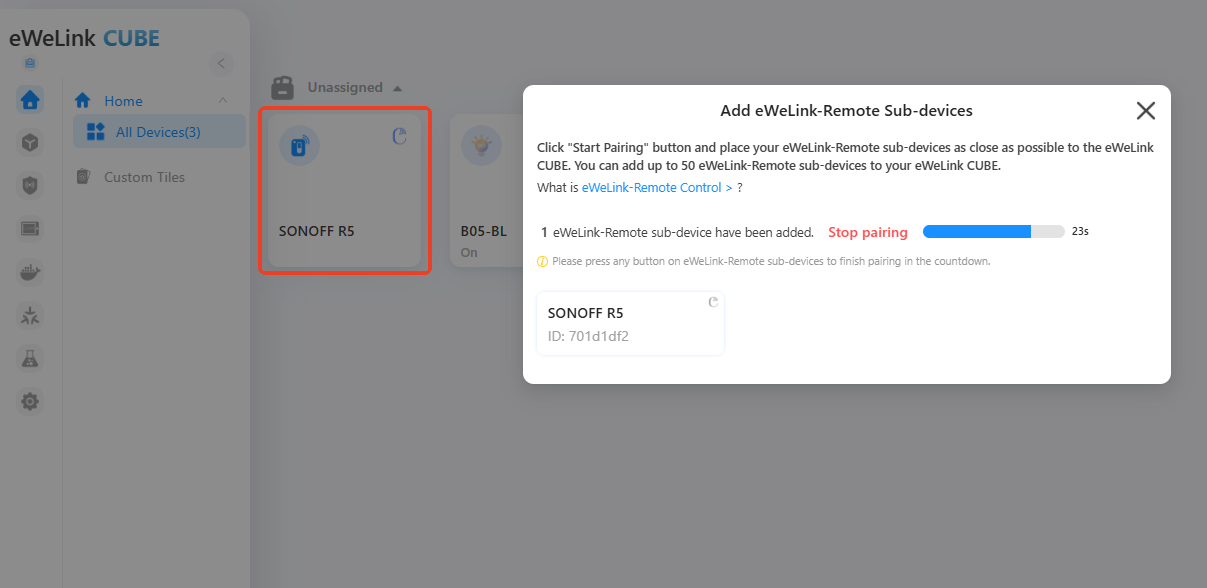
在您的 **SONOFF R5**上，按任意按钮一次。这将发送配对信号。
{% endstep %}

{% step %}
配对成功后，R5 将出现在您的设备列表中。

<figure><img src="https://2213833752-files.gitbook.io/~/files/v0/b/gitbook-x-prod.appspot.com/o/spaces%2FCnF8kmk9yw3yiy2mRerq%2Fuploads%2FKnzBLUamlXNR4kqB78yD%2Fimage.png?alt=media&#x26;token=7a44a10f-8840-454d-bb2a-e40885634c02" alt=""><figcaption></figcaption></figure>
{% endstep %}
{% endstepper %}

## 3. 为 eWeLink-Remote 子设备配置智能场景

添加 eWeLink-Remote 子设备后，您可以通过将其与其他智能设备关联来实现联动，方法是 **智能场景**.

{% stepper %}
{% step %}
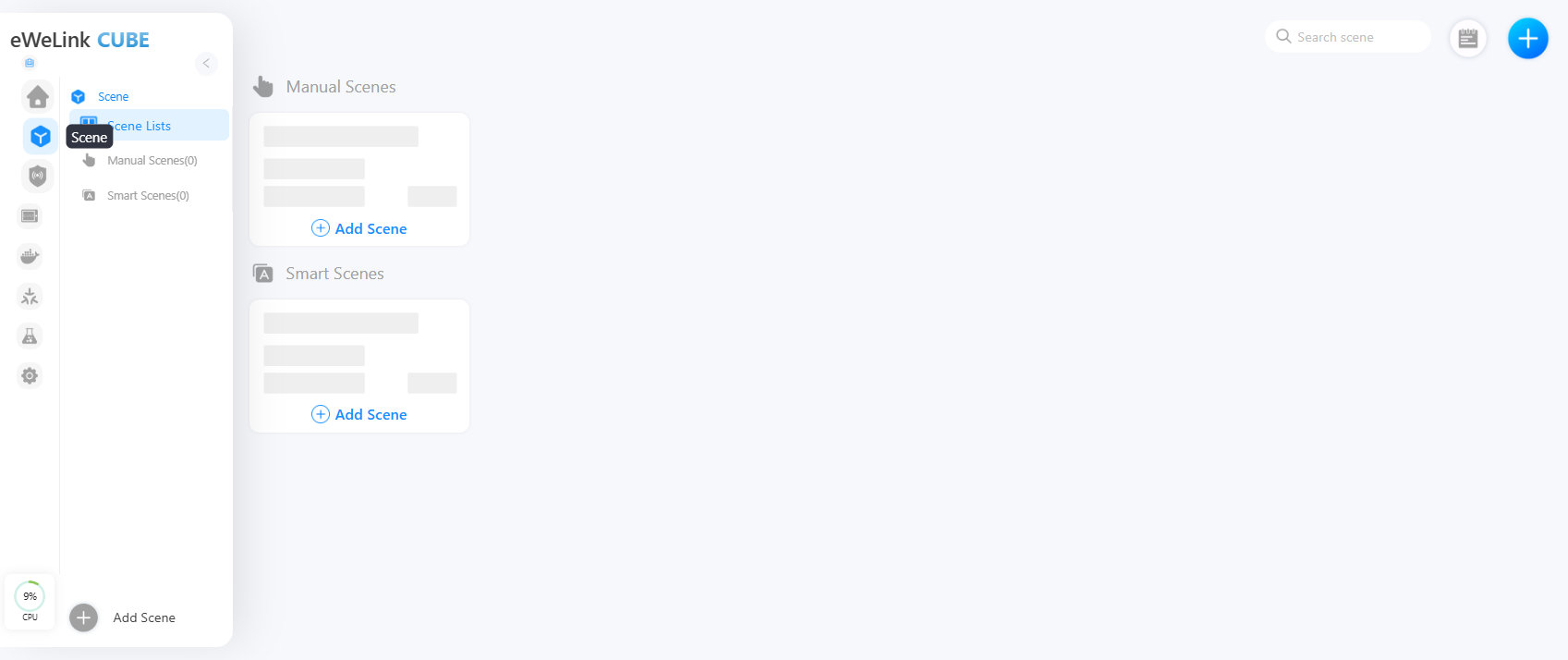
前往 **场景** 页面。

<figure><img src="https://2213833752-files.gitbook.io/~/files/v0/b/gitbook-x-prod.appspot.com/o/spaces%2FCnF8kmk9yw3yiy2mRerq%2Fuploads%2FUT2q7a9NvXxxXmu6HeKp%2Fimage.png?alt=media&#x26;token=48bb0892-bfe3-42c1-a0f4-8e1b82719901" alt=""><figcaption></figcaption></figure>
{% endstep %}

{% step %}
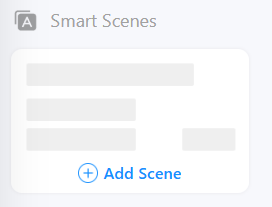
在 **智能场景** 选项卡下，点击 **添加场景**.

<div align="left"><figure><img src="https://2213833752-files.gitbook.io/~/files/v0/b/gitbook-x-prod.appspot.com/o/spaces%2FCnF8kmk9yw3yiy2mRerq%2Fuploads%2Fu6xWKp5UDhuX9nL97u2W%2Fimage.png?alt=media&#x26;token=82f4f888-4d66-46d0-bcf2-7e5516a0dc89" alt=""><figcaption></figcaption></figure></div>
{% endstep %}

{% step %}
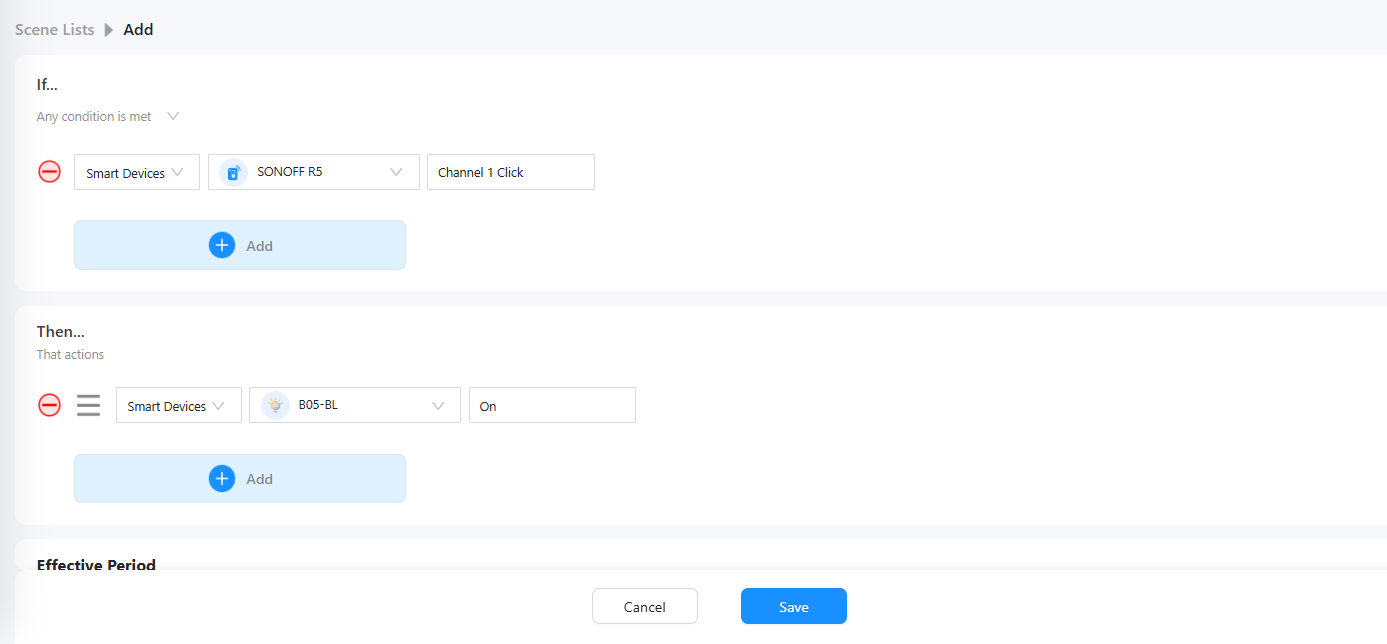
设置 **如果** 条件：

**添加智能设备 → SONOFF R5 → 启用无线按键 → 通道 1 → 点击 → 完成。**
{% endstep %}

{% step %}
设置 **然后** 动作：

**添加智能设备 → SONOFF B05-BL → 启用开关 → 开 → 完成。**
{% endstep %}

{% step %}
保存您的智能场景。

<figure><img src="https://2213833752-files.gitbook.io/~/files/v0/b/gitbook-x-prod.appspot.com/o/spaces%2FCnF8kmk9yw3yiy2mRerq%2Fuploads%2FmskMAoTHPX0TcR6nwqEK%2Fimage.png?alt=media&#x26;token=ce493825-a4db-4fc2-8f8b-bf0f056c6efd" alt=""><figcaption></figcaption></figure>
{% endstep %}
{% endstepper %}

现在，当您按下 R5 按钮时，连接的 B05-BL 灯将自动打开。