> For the complete documentation index, see [llms.txt](https://cube.ewelink.cc/llms.txt). Markdown versions of documentation pages are available by appending `.md` to page URLs; this page is available as [Markdown](https://cube.ewelink.cc/english-zh/gong-neng-tan-suo/an-fang-xi-tong.md).
# 安防系统
了解如何在 CUBE OS 中配置和使用内置安防模式,保护你的智能家居。
CUBE OS 包含一个 **安全系统** 功能,可让您使用已连接的传感器——例如运动探测器、门/窗传感器或其他触发器——来监控您的家并触发警报或自动化。
如果您的设备硬件支持,内置扬声器可以充当 **警笛**,而其他系统可以通过已配置的动作触发警报或自动化。
## 1. 安全模式
CUBE OS 提供 **三种预定义模式** 以匹配您的日常安排:
模式
说明
在家模式
当您在家且只想部分监控(例如,仅门传感器启用)。
外出模式
当您不在家时——所有选定的传感器将触发警报。
睡眠模式
当您在家但睡着时,通常只有周边传感器保持激活。
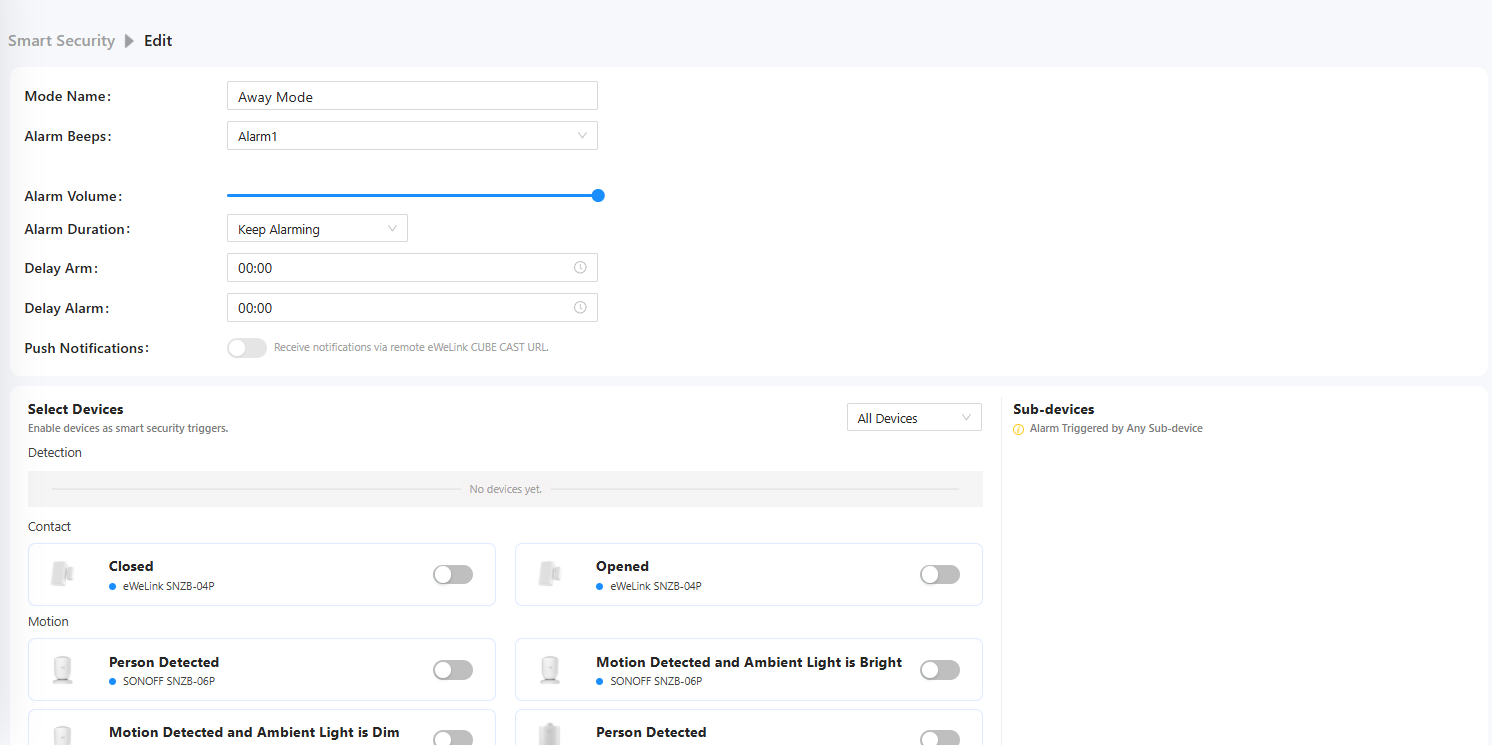
在此示例中,我们将重点放在 **外出模式**,该模式在无人居住时使用。
## 2. 配置外出模式
{% stepper %}
{% step %}
从主菜单打开 **安全系统** 。
{% endstep %}
{% step %}
点击 **外出模式** 卡以打开配置面板。
{% endstep %}
{% step %}
设置以下选项:
**警笛类型** – 在内置或关联的警笛设备之间选择。
**音量** – 调整警报响度。
**触发传感器** – 切换您想要包含的传感器开关。
{% endstep %}
{% endstepper %}
活动传感器会显示在屏幕右侧。\
启用后,这些传感器在检测到运动或门/窗被打开时会自动触发警报。
## 3. 触发警报时会发生什么
当系统处于 **外出模式**状态时,且任何所选传感器被激活:
1. 将立即发出 **警笛** (如果支持)。
2. 系统可以触发关联的 **自动化** ——例如:
* 发送通知
* 打开所有灯光
* 关闭百叶窗
* 通过已连接的摄像头录制视频
---
# Agent Instructions
This documentation is published with GitBook. GitBook is the documentation platform designed so that both humans and AI agents can read, navigate, and reason over technical content effectively. Learn more at gitbook.com.
## Querying This Documentation
If you need additional information that is not directly available in this page, you can query the documentation by asking a question.
Perform an HTTP GET request on the following URL with the `ask` and `goal` query parameters:
```
GET https://cube.ewelink.cc/english-zh/gong-neng-tan-suo/an-fang-xi-tong.md?ask=&goal=
```
`ask` is the immediate question: it should be specific, self-contained, and written in natural language.
`goal` is what the user is ultimately trying to achieve, the reason they need the answer. Sharing it helps GitBook give you a better, more relevant answer. A goal is most helpful when it describes the outcome the user wants rather than restating the question. For example, with `ask=how do I create an API token`, a goal like `automate deployments from our CI pipeline` lets GitBook tailor the answer to that use case.
The response will contain a direct answer to the question and relevant excerpts and sources from the documentation.
Use this mechanism when the answer is not explicitly present in the current page, you need clarification or additional context, or you want to retrieve related documentation sections.