# Synology NAS
## 1. Подготовка
Пожалуйста, убедитесь, что ваша конфигурация соответствует следующим требованиям:
{% stepper %}
{% step %}
**6 ГБ ОЗУ** установлено (рекомендуется) в вашем Synology NAS (4 ГБ для виртуальной машины с CUBE OS); обратитесь в Synology за инструкциями по обновлению, если в вашем устройстве всего 2 ГБ или меньше памяти.
{% endstep %}
{% step %}
Ваш NAS имеет платформу x86\_64
{% hint style="info" %}
В настоящее время этот метод установки поддерживает только архитектуру x86\_64.
Для ARM и других платформ обратитесь к другим устройствам и ожидайте будущих обновлений.
{% endhint %}
{% hint style="info" %}
Вы можете обратиться к этому официальному [документу](https://kb.synology.com/en-me/DSM/tutorial/What_kind_of_CPU_does_my_NAS_have) чтобы найти информацию о платформе для ваших устройств Synology.
{% endhint %}
{% endstep %}
{% step %}
Доступ в WAN для загрузки менеджера виртуальных машин
{% endstep %}
{% step %}
Учетная запись администратора вашего Synology NAS
{% endstep %}
{% step %}
Адаптер Zigbee (необязательно)
Если вам нужно добавлять устройства Zigbee, подготовьте Zigbee-донгл. Протестированные Zigbee-донглы включают:
{% endstep %}
{% endstepper %}
## 2. Установка
{% stepper %}
{% step %}
Перейдите по этой [репозиторию](https://github.com/eWeLinkCUBE/CUBE-OS/releases/latest) чтобы загрузить образ CUBE OS, заканчивающийся на `.vdi`
{% endstep %}
{% step %}
Доступ к панели управления Synology
 {% endstep %}
{% step %}
Установите `Virtual Machine Manager` из Центра пакетов
{% endstep %}
{% step %}
Установите `Virtual Machine Manager` из Центра пакетов
 {% endstep %}
{% step %}
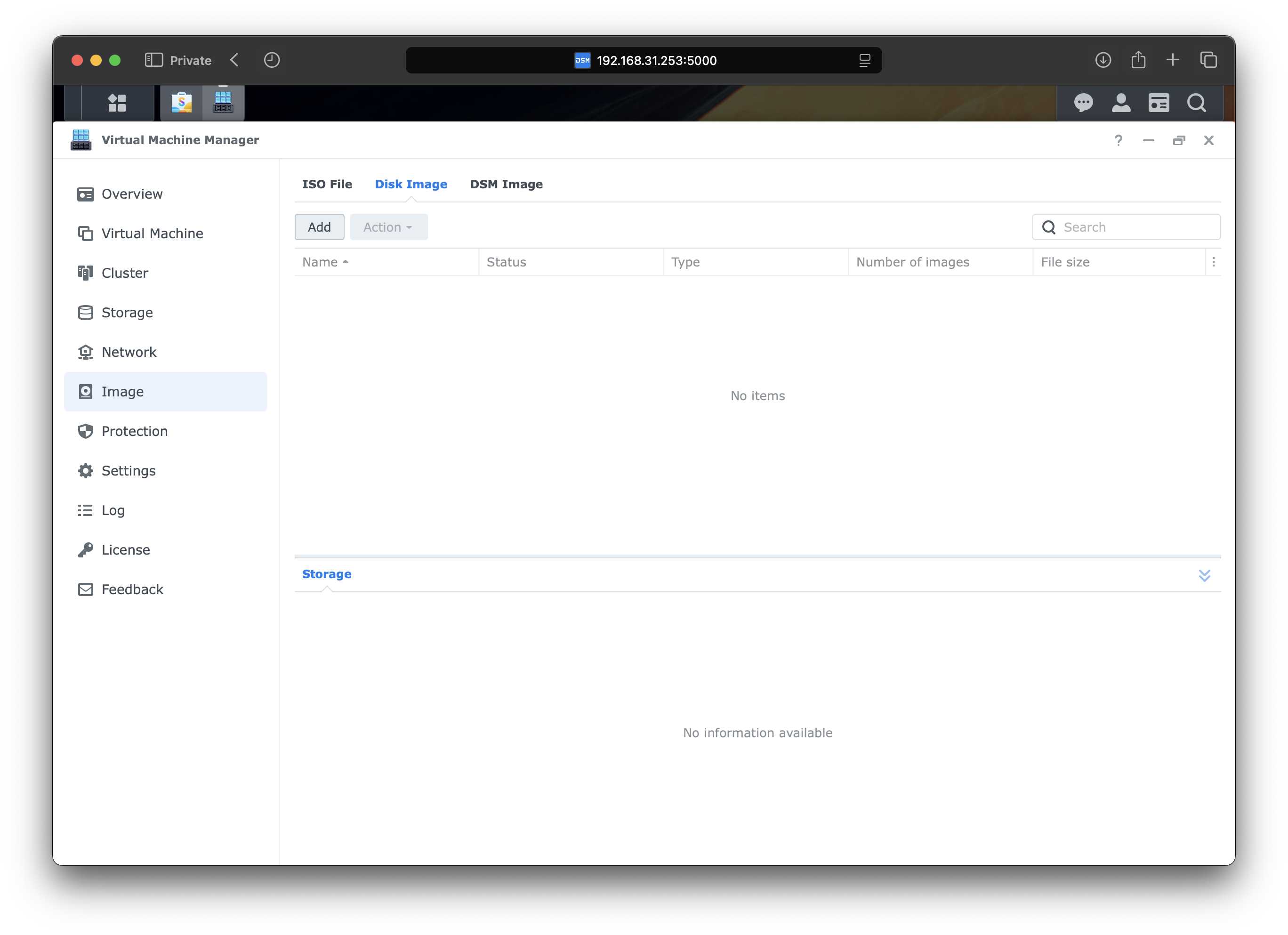
Запустите `Virtual Machine Manager` с панели управления и переключитесь на страницу Изображения.
{% endstep %}
{% step %}
Перейдите на вкладку Дисковые образы, затем нажмите `Добавить` кнопку.
{% endstep %}
{% step %}
Запустите `Virtual Machine Manager` с панели управления и переключитесь на страницу Изображения.
{% endstep %}
{% step %}
Перейдите на вкладку Дисковые образы, затем нажмите `Добавить` кнопку.
 {% endstep %}
{% step %}
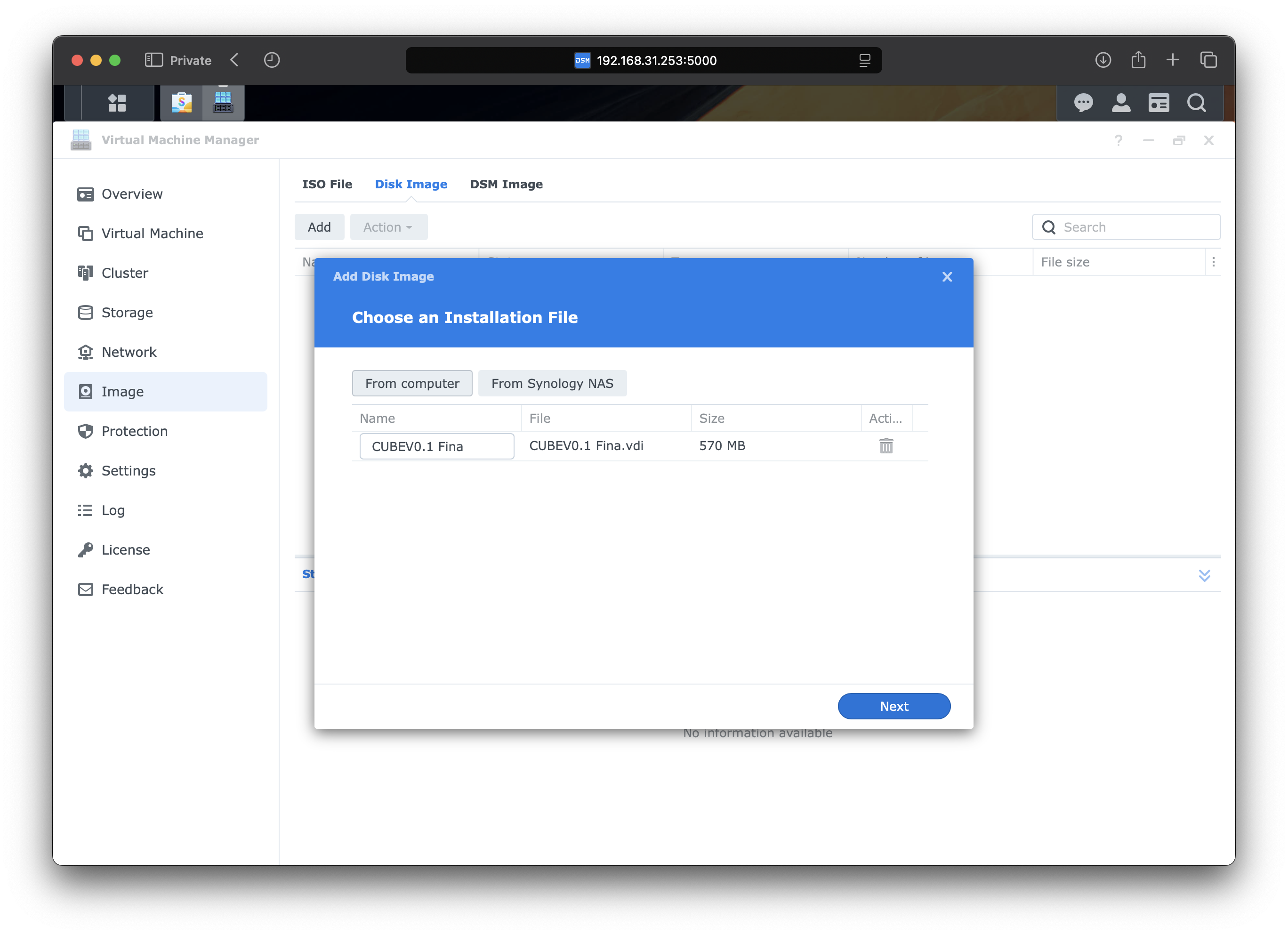
Следуйте инструкциям, чтобы загрузить `.vdi` файл, который вы скачали на предыдущем [шаге](#preparation).
{% endstep %}
{% step %}
Следуйте инструкциям, чтобы загрузить `.vdi` файл, который вы скачали на предыдущем [шаге](#preparation).
 {% endstep %}
{% step %}
Завершите шаги и дождитесь полного окончания загрузки.
{% endstep %}
{% step %}
Переключитесь на `вкладку Изображение` и загрузите .vdi-файл на ваш NAS. Пожалуйста, дождитесь завершения загрузки.
{% endstep %}
{% step %}
Завершите шаги и дождитесь полного окончания загрузки.
{% endstep %}
{% step %}
Переключитесь на `вкладку Изображение` и загрузите .vdi-файл на ваш NAS. Пожалуйста, дождитесь завершения загрузки.
 {% endstep %}
{% step %}
Переключитесь на `Страница виртуальной машины` и нажмите на значок раскрывающегося списка рядом с `Создать` кнопкой и используйте `Импорт`.
{% endstep %}
{% step %}
Переключитесь на `Страница виртуальной машины` и нажмите на значок раскрывающегося списка рядом с `Создать` кнопкой и используйте `Импорт`.
 {% endstep %}
{% step %}
Выберите `Опцию «Импорт из дисковых образов»` в мастере.
{% endstep %}
{% step %}
Выберите `Опцию «Импорт из дисковых образов»` в мастере.
 {% endstep %}
{% step %}
Выберите хранилище, куда вы загрузили файл виртуального диска.
{% endstep %}
{% step %}
Выберите хранилище, куда вы загрузили файл виртуального диска.
 {% endstep %}
{% step %}
Установите вычислительные ресурсы, необходимые CUBE OS.
{% hint style="info" %}
**Рекомендуется 2 vCPU и 4 ГБ ОЗУ для лучшего опыта.**
{% endhint %}
{% endstep %}
{% step %}
Установите вычислительные ресурсы, необходимые CUBE OS.
{% hint style="info" %}
**Рекомендуется 2 vCPU и 4 ГБ ОЗУ для лучшего опыта.**
{% endhint %}
 {% endstep %}
{% step %}
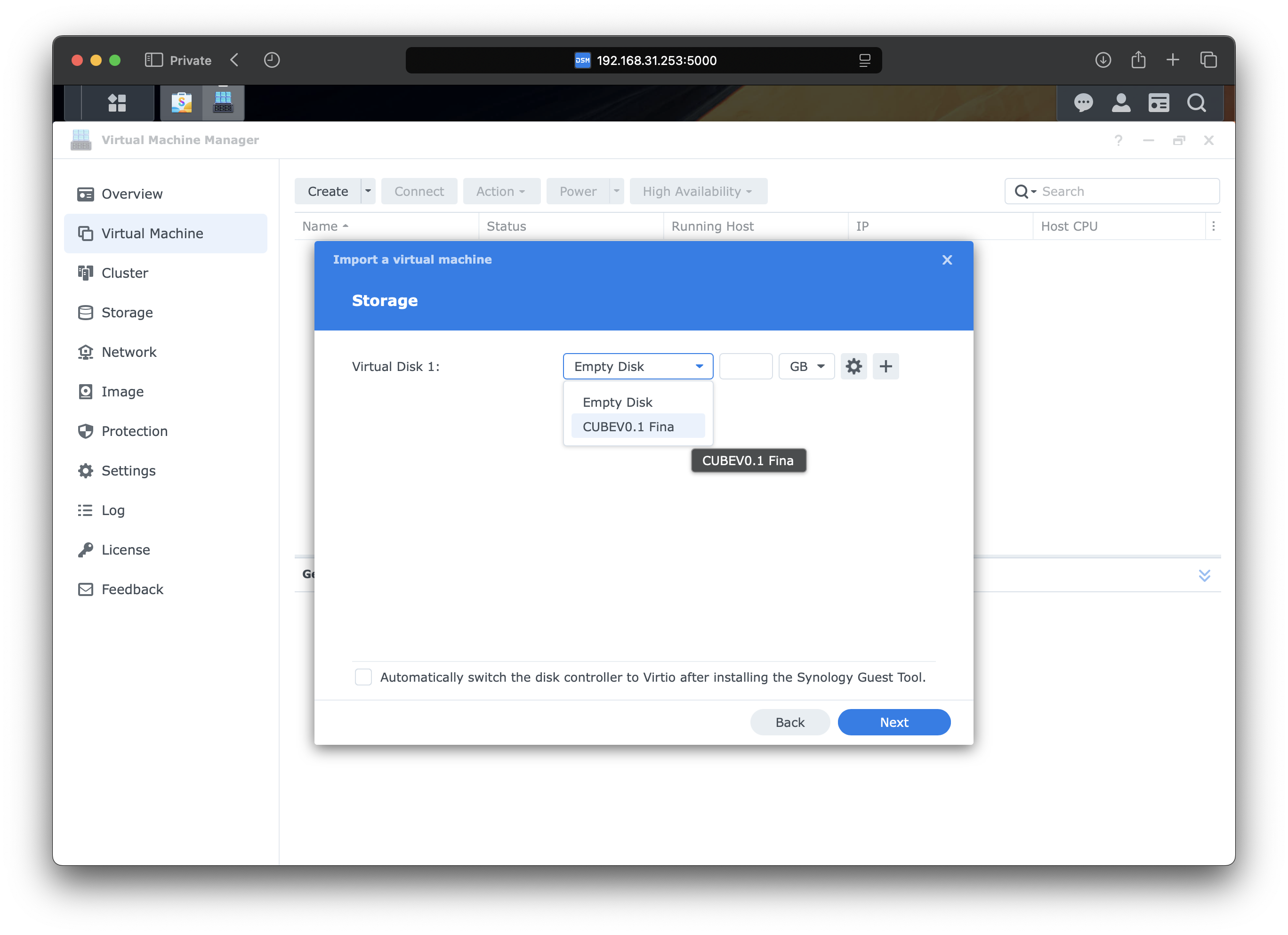
Выберите виртуальный диск в выпадающем списке.
{% endstep %}
{% step %}
Выберите виртуальный диск в выпадающем списке.
 {% endstep %}
{% step %}
⚠️ Для `Другие настройки`выберите `UEFI` в `параметре Прошивки` опции.

{% endstep %}
{% step %}
Необязательно: подключите ваш Zigbee-донгл к NAS и пропустите устройство в виртуальную машину на этой странице.
{% endstep %}
{% step %}
⚠️ Для `Другие настройки`выберите `UEFI` в `параметре Прошивки` опции.

{% endstep %}
{% step %}
Необязательно: подключите ваш Zigbee-донгл к NAS и пропустите устройство в виртуальную машину на этой странице.
 {% endstep %}
{% step %}
Назначьте права управления учетным записям вашего NAS.
{% endstep %}
{% step %}
Финальная проверка вашей конфигурации, проверьте `Включите виртуальную машину после создания` и нажмите `Готово`
{% endstep %}
{% step %}
Назначьте права управления учетным записям вашего NAS.
{% endstep %}
{% step %}
Финальная проверка вашей конфигурации, проверьте `Включите виртуальную машину после создания` и нажмите `Готово`
 {% endstep %}
{% step %}
Подождите несколько минут. Введите [cube.local](http://cube.local) в вашем браузере, чтобы получить доступ к странице начальной настройки.
Вы также можете получить к ней доступ по IP-адресу.
{% endstep %}
{% step %}
Подождите несколько минут. Введите [cube.local](http://cube.local) в вашем браузере, чтобы получить доступ к странице начальной настройки.
Вы также можете получить к ней доступ по IP-адресу.
 {% endstep %}
{% endstepper %}
{% endstep %}
{% endstepper %}